
+100 em estoque
Sobre este jogo
Informações do produto

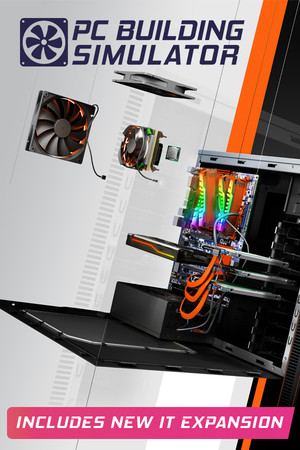
Build your very own PC empire, from simple diagnosis and repairs to bespoke, boutique creations that would be the envy of any enthusiast. With an ever-expanding marketplace full of real-world components you can finally stop dreaming of that ultimate PC and get out there, build it and see how it benchmarks in 3DMark!
PC Building Simulator has already enjoyed viral success with over 650,000+ downloads of its pre-alpha demo and has now been lovingly developed into a fully-fledged simulation to allow you to build the PC of your dreams.
Take charge of IT support for Irratech Corp in the IT Expansion which features over 20 hours of additional story content, included in PC Building Simulator completely for free.



The career mode in PC Building Simulator puts you in charge of your very own PC building and repair business. From your own cozy workshop, you must use all your technical skills to complete the various jobs that come your way.
Customers will provide you with a range of jobs from simple upgrades and repairs to full system builds which you must complete while balancing your books to ensure you are still making a profit!

PC Building Simulator will allow you to experiment with a large selection of accurately modelled, fully licensed parts from your favourite real-world manufacturers.
If money was no object, what would you build?
Build your PC from the case up with your favourite parts and express your building flair by choosing your favourite LED and cabling colors to really make it stand out. Choose from a range of air and water cooling solutions to keep it cool or even go all out with fully customizable water cooling loops! Once your rig is ready to go, turn it on and see how it benchmarks. Not happy with the results? Jump into the bios and try your hand at overclocking to see if you can get better results without breaking anything!

Does building your own PC seem like an impossible task?
PC Building Simulator aims to teach even the most novice PC user how their machine is put together with step-by-step instructions explaining the order parts should be assembled and providing useful information on what each part is and its function.
-----metadata variantImages: KEY STEAM::0~~KEY STEAM + TODAS AS DLC::0 steamId: 621060 images: - https://shared.akamai.steamstatic.com/store_item_assets/steam/apps/621060/ss_1892565852a14a83465ff6032226b2ecba85eaf0.1920x1080.jpg?t=1653555111 - https://shared.akamai.steamstatic.com/store_item_assets/steam/apps/621060/ss_20744bfd39bbb259a4b1da3a64f0adaff112c9de.1920x1080.jpg?t=1653555111 - https://shared.akamai.steamstatic.com/store_item_assets/steam/apps/621060/ss_cf5069fc35b3e8b45b6bf75e2ea0d65cc2a21fe5.1920x1080.jpg?t=1653555111 - https://shared.akamai.steamstatic.com/store_item_assets/steam/apps/621060/ss_d663a3ff5b14ba7f2afc2290c542fa8b14dc80bd.1920x1080.jpg?t=1653555111 - https://shared.akamai.steamstatic.com/store_item_assets/steam/apps/621060/ss_c53c85636744da76595b452673e450b589dd6d85.1920x1080.jpg?t=1653555111 - https://shared.akamai.steamstatic.com/store_item_assets/steam/apps/621060/ss_8d01a8bbb6fc411f0e54a9ea4914f54879604726.1920x1080.jpg?t=1653555111 - https://shared.akamai.steamstatic.com/store_item_assets/steam/apps/621060/ss_0ce636d46896a59556a48fa84225e02884182861.1920x1080.jpg?t=1653555111 - https://shared.akamai.steamstatic.com/store_item_assets/steam/apps/621060/ss_23384427b8c44ac453007d9361afeaedfe4f2316.1920x1080.jpg?t=1653555111 - https://shared.akamai.steamstatic.com/store_item_assets/steam/apps/621060/ss_ee4654e66133456c7abb08c321aa28879eade334.1920x1080.jpg?t=1653555111 - https://shared.akamai.steamstatic.com/store_item_assets/steam/apps/621060/ss_b813b856217f9eebf428bfc8880bb9b7a4ac7ab9.1920x1080.jpg?t=1653555111 videos: - https://cdn.akamai.steamstatic.com/steam/apps/256741664/movie_max.mp4 - https://cdn.akamai.steamstatic.com/steam/apps/256857379/movie_max.mp4 reqMin: Sistema Operativo::Windows 7 or higher~~Processador::Intel Core i5-2500K or AMD Athlon X4 740 (or equivalent)~~Memória::4 GB de RAM~~Placa gráfica::GeForce GTX 660 (2048 MB) or Radeon R9 285 (2048 MB) - Integrated GPUs may work but are not supported.~~DirectX::Versão 9.0c~~Espaço no disco::Requer 30 GB de espaço livre~~Placa de som::DirectX compatible -----
Mínimos
Recomendados
Você ativa direto na sua conta
Steam, sem segredo
Abra a Steam logado na sua conta, clique em Ativar um produto no Steam e cole a key.
A janela oficial confirma e o jogo fica associado à sua conta.



Ativar um produto no Steam
Este é o formato de um código de produto:
XXXXX-XXXXX-XXXXXPC Building Simulator
O produto foi ativado com sucesso e está permanentemente associado à sua conta Steam.
Perguntas frequentes
Os jogos aparecem para meus amigos na Família Steam?
Sim! Os jogos adquiridos na KeysSteam podem ser compartilhados com os membros da sua Família Steam, desde que sejam compatíveis com o recurso de compartilhamento familiar da plataforma.
O jogo fica na minha Steam para sempre?
Sim! Após a ativação, o jogo fica vinculado à sua conta Steam, sem necessidade de pagamentos adicionais ou assinaturas. Nossas Keys não possuem prazo de validade.
Posso comprar hoje e resgatar em outro dia?
Sim! Você não precisa ativar sua Key imediatamente após a compra. Ela ficará disponível nos detalhes do seu pedido, permitindo que você realize a ativação quando desejar.
Vocês realizam reembolsos?
Sim! Caso você tenha algum problema com a ativação ou o funcionamento do jogo, nossa equipe de suporte estará à disposição para ajudá-lo. Se não conseguirmos solucionar o problema, seu reembolso será aprovado no mesmo dia, sem burocracia, respeitando também seus direitos como consumidor.
Se eu formatar meu PC ou trocar de computador, perderei meus jogos?
Não! Os jogos são vinculados à sua conta Steam, e não ao seu computador. Você pode formatar seu PC, trocar de máquina ou reinstalar o sistema operacional. Basta acessar novamente sua conta Steam para ter acesso aos jogos vinculados à sua biblioteca.
Produtos Similares


Suporte KeysSteam
Precisa de ajuda?
Fale com a equipe no nosso servidor do Discord. Atendimento feito por pessoas, direto com quem cuida dos pedidos.